Example 1
This example demonstrates how to update a Event Listing using the Put API endpoint.
Body Structure (form-data)
The request should be sent as form-data, including the fields to be updated.
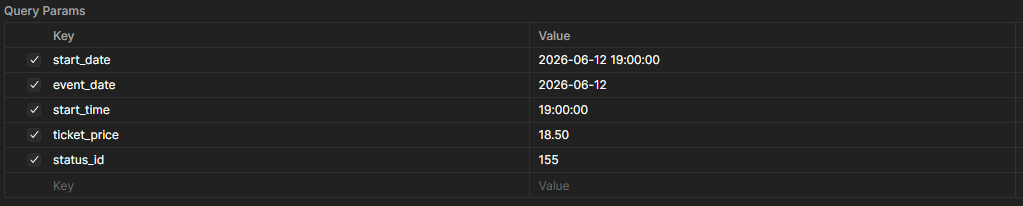
Response Structure
{
    "message": "Successfully updated  with ID 1",
    "payload": {
        "id": 1,
        "event_name": "Neon Pulse Album Launch",
        "description": "An electrifying launch night featuring live indie performances, exclusive previews of Neon Pulse’s new album, and guest DJ sets.",
        "start_date": "2026-06-12 19:00:00",
        "end_date": "2026-06-12 23:00:00",
        "event_date": "2026-06-12",
        "start_time": "19:00:00",
        "category_id": 147,
        "tags_id": "152",
        "ticket_price": "18.50",
        "is_online": 0,
        "is_featured": 1,
        "banner_image_id": 8,
        "gallery_id": "10,9",
        "status_id": "155",
        "created_at": "2026-05-07 10:32:52",
        "updated_at": "2026-05-07 10:36:13",
        "deleted_at": null,
        "author_id": 1,
        "group_id": null
    }
}
Fields
| Field | Type |
|---|---|
event_name |
Varchar |
description |
Text Area |
start_date |
Date Time |
end_date |
Date Time |
event_date |
Date |
start_time |
Time |
category_id |
Select |
tags_id |
Multi Select |
ticket_price |
Decimal |
is_online |
Checkbox |
is_featured |
Checkbox |
banner_image_id |
Image Upload |
gallery_id |
Multiple Image Upload |
status_id |
Radio Button |